


Kahoot! Play & Create Quizzes
Kahoot!
I found Kahoot! Play & Create Quizzes easiest to understand when I stopped treating it like a traditional study app. It is really a lively way to turn questions into short learning games, whether I am answering alone, joining a session organized by someone else, or preparing a quiz for a group. That difference matters: the app can make revision feel less like rereading notes, but it works best when the questions are well chosen and the people using it are willing to participate.
The app comes from Kahoot!, a developer well known for putting quizzes into classrooms, homes, and workplaces. It is a free education app for Everyone, although optional in-app purchases range from $2.99 to $474.99 per item. Its broad appeal is reflected in a 4.7 average from around 850 thousand ratings and more than 50 million installs. I would not read those figures as a promise that every quiz will be excellent, but they do show that this is a mature, widely used tool rather than a niche experiment.
What to expect before you start
The first thing to know is that Kahoot! is not a complete course in a subject. It does not replace a teacher, textbook, language program, or carefully structured revision plan. Instead, it supplies the game-like question-and-answer layer that can make practice more active. You still need a useful quiz, a clear goal, and enough time to think about the answers afterward.
That makes the experience different from flashcard apps. Flashcards usually focus on repeated recall at your own pace, while Kahoot! adds a more public, energetic rhythm. It can also feel different from ordinary online quizzes because the atmosphere is often built around quick choices, visible progress, and a sense of occasion. For a family review session or a classroom warm-up, that energy is a strength. For quiet, deep study late at night, it may be more distraction than help.
I also like that the same basic idea fits several situations. A student can use a quiz to check understanding, a parent can turn a few questions into a light family activity, and a team can use one to revisit information after a presentation. The app’s store summary describes creating and playing learning games at school, at home, or at work, and that range feels accurate in practice. The important distinction is that the quality of the experience depends heavily on who creates the questions and how the session is run.
Latest News

Uber Eats Under Pressure: What Happens When Delivery Goes Wrong

How QR & Barcode Scanner Adapts to Android and iOS Innovations

Why Waze Navigation & Live Traffic Is Your Essential Travel Companion

CapCut Mastery: Unleash Hidden Features for Pro-Level Editing

How OS Updates Enhance Roblox Adventures

Teacher Simulator: Exam Time Turns Quick Classroom Judgments into a Repetitive Loop
For a first-time user, I would set a modest goal: do not try to master every part of the app on the first visit. Aim to find one suitable quiz, complete it, and review the questions you missed. That small success tells you much more than browsing a long collection of possible activities.
Installing it without overthinking the choice
The app is free to install, and its current version is 6.6.1.1. It requires Android 8.0 or later when used on Android. Those details are worth checking before you begin, especially if you are setting it up on an older spare phone or a school device. On iOS, the download process follows the normal App Store route, but the practical experience still depends on the device and the session you want to join.
I would also decide in advance whether you need a player experience, a creator experience, or both. Someone joining a quiz prepared by a teacher may only need to answer questions. Someone organizing a revision session needs time to choose or prepare material and test the flow. Thinking about that role early prevents the common mistake of installing the app while a group is already waiting.
Gallery
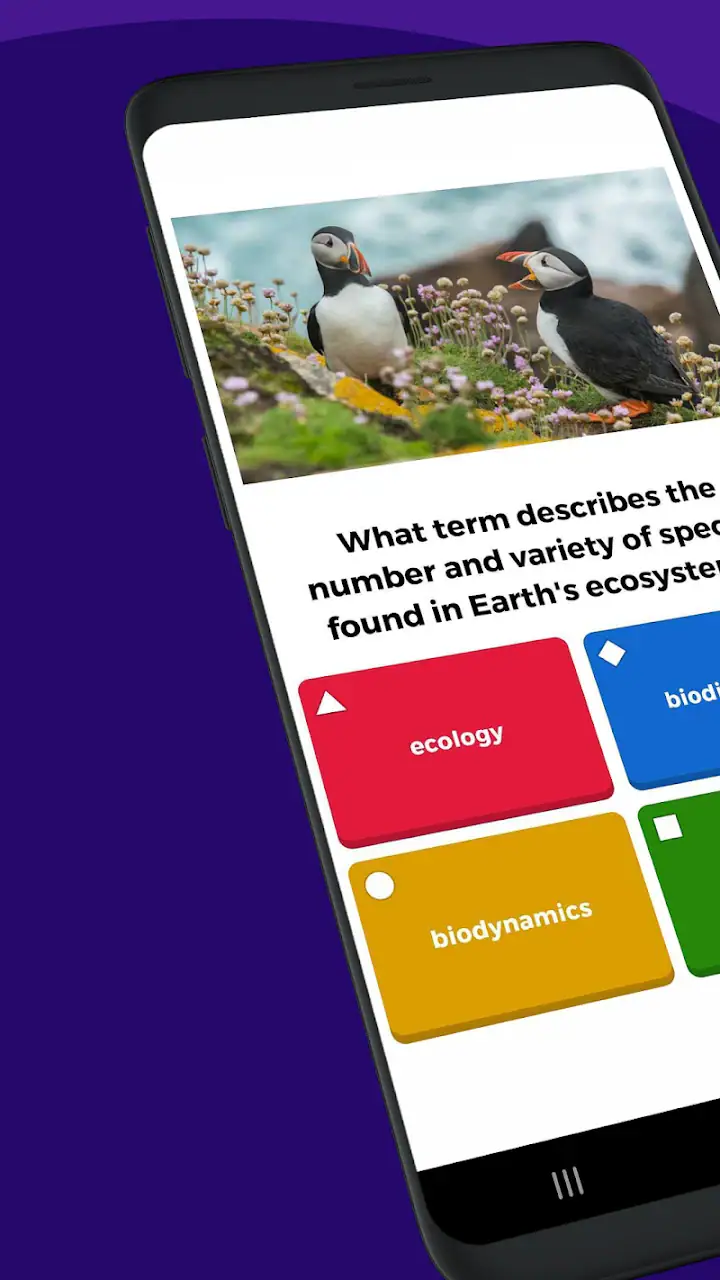
The free entry point is helpful, but I would not assume that every possible option belongs to the free experience. Optional purchases exist, and the listed range is wide, from a small individual item to a much higher-priced item. I recommend starting with the basic workflow before spending anything. First confirm that the question format suits your class, family, or team; only then consider whether an optional upgrade solves a real problem for you.
Setting up a first session
When I prepare a first session, I begin with the audience rather than the subject. A quiz for young children needs different wording from one for colleagues. Questions should be short enough to understand quickly, but not so obvious that the activity becomes a sequence of guesses. If the goal is learning rather than entertainment, I include questions that reveal a misconception instead of only asking for facts everyone already knows.
For a group session, I keep the first activity compact. A long quiz can lose momentum, particularly when participants are still learning how the app works. A shorter set gives everyone time to understand the answer screen, recover from an accidental choice, and discuss the result. I also read the questions aloud when the group includes younger players or anyone who may struggle to scan text quickly.
One useful workflow is to run the quiz once as a private rehearsal. I check whether each question makes sense without extra explanation, whether the correct answer is unambiguous, and whether the order feels sensible. This is more important than making the quiz visually impressive. A confusing question creates noise in the results, and a noisy result can make learners think they misunderstood the subject when the real problem was the wording.
If you are joining someone else’s session, keep the joining instructions nearby and make sure you know which quiz you are supposed to play. In a busy room, several activities may be happening at once. I have found that confirming the session before answering is a simple way to avoid the embarrassing situation of completing the wrong activity with confidence.
The first meaningful success
For me, the first meaningful success is not merely finishing a quiz. It is finishing one and learning something from the mistakes. After answering, I look at the questions that caused hesitation and separate three possibilities: I did not know the answer, I read too quickly, or the question itself was unclear. That small review turns a playful round into actual study.
A teacher or parent can make this step more useful by pausing after selected questions instead of rushing immediately to the next round. Ask why one answer is correct and why the alternatives are wrong. The discussion is often more valuable than the score. Kahoot! creates the prompt for that conversation, but the human explanation is what gives the activity educational depth.
For solo use, I recommend writing down a tiny follow-up task after the quiz. It might be checking one unfamiliar term, explaining a missed answer in your own words, or trying a similar question later. This prevents the familiar problem of confusing recognition with knowledge. Choosing the right answer from a screen can feel easy; recalling and explaining it without the choices is a stronger test.
For a work setting, the best first success may be identifying a shared gap rather than naming a winner. If several people miss the same question, that is a useful signal about what needs clarification. I would avoid using the score as a serious judgment of professional ability. The fast, competitive format rewards confidence and speed as well as understanding, so results need context.
Where new users commonly get confused
The biggest source of confusion is the difference between playing and creating. A person who only wants to join a quiz may not need to design anything, while the person hosting the activity must think about content, sequence, and timing. These are related experiences inside one app, but they are not the same task. Decide which side you are on before exploring every available option.
Another misunderstanding is assuming that a high score automatically means strong learning. A fast player may gain an advantage, and a familiar question may reward memory without deeper understanding. I treat the score as a useful snapshot, not a final assessment. If accuracy matters, I follow up with an explanation, a written response, or a second activity that removes the answer choices.
People also sometimes blame the app when the real issue is quiz design. A question with two plausible answers, unfamiliar wording, or an answer that depends on a hidden assumption will frustrate players. Before repeating a difficult round, I inspect the question itself. Editing the wording or adding a short explanation can improve the next attempt more than changing the game settings.
There is also a social trade-off. The lively format can motivate a group, but it may make a shy learner uncomfortable, especially if mistakes feel public. I would offer a low-pressure explanation of the activity and avoid turning every round into a competition. If the aim is practice, celebrate improvement and good reasoning rather than only the fastest result.
Finally, do not confuse the app with a complete answer to accessibility or classroom management. A host may still need to read questions aloud, provide extra time, pair learners, or choose a different activity when rapid screen interaction is unsuitable. Kahoot! can support an inclusive session, but it does not remove the responsibility to adapt the session to the people in it.
Three practical habits that improve the experience
My first habit is to use the app as a diagnostic tool. Instead of asking, “Who won?”, I ask, “Which idea caused the most uncertainty?” This changes the purpose of the quiz from entertainment alone to targeted revision. It is especially helpful after a lesson or meeting, when the group needs a quick indication of what should be revisited.
My second habit is to separate speed from confidence. When I create or select a quiz, I do not make every question a race. I allow the group to think, then use the result as a starting point for conversation. This makes the activity more useful for subjects where reasoning matters more than instant recall.
My third habit is to prepare a backup plan. A quiz can lose its value if the audience is tired, the questions are too difficult, or the session becomes overly competitive. I keep a simple discussion or written exercise ready so the learning does not depend entirely on the game. That is not a criticism of Kahoot!; it is a realistic way to use a lively tool responsibly.
A less obvious advantage is that creating questions forces me to examine what I actually want people to remember. Writing a plausible wrong answer is surprisingly revealing: if I cannot explain why an alternative is wrong, the learning objective may not be clear enough. In that sense, the creator side can improve the host’s own preparation, not just the players’ practice.
Who will enjoy it, and who should choose something else
I would recommend Kahoot! to teachers who want a quick check for understanding, families looking for a shared learning activity, and teams that need an engaging way to revisit information. It is also a good fit for learners who respond well to short challenges and immediate feedback. The free starting point makes it easy to test without committing to a paid study service.
I would be more cautious if your main goal is long-form concentration, detailed note-taking, or systematic spaced repetition. A dedicated flashcard app may be better for memorizing large amounts of vocabulary. A course platform may be better when you need lessons, explanations, assignments, and progress organized in one place. A conventional form or survey may be preferable when answers must be collected calmly without a competitive atmosphere.
It is not the right choice for every group, either. If participants have limited access to compatible devices, dislike public scoring, or need extensive written explanations, the game format may create more friction than value. In those cases, I would use it only as an optional warm-up or skip it in favor of a slower method.
A realistic first-day example
Imagine a parent helping a teenager review science before a test. I would not begin by searching for the longest quiz available. I would choose a short activity related to the topic, let the teenager answer without interruption, and note the questions that produced hesitation. Afterward, we would discuss only those points and return to the material for a few minutes. The app provides momentum; the conversation provides the learning.
In a classroom, a teacher could use the same pattern at the start of a lesson to uncover prior knowledge, then repeat a focused activity later to see whether the explanation helped. At work, a manager might use a few questions after training, not to rank employees, but to identify instructions that need clearer examples. In each case, the useful workflow is the same: play, inspect the result, explain, and apply.
That sequence is why I think the app is more valuable when someone takes responsibility for the follow-through. If everyone simply celebrates the top score and closes the app, the experience may be fun but educationally thin. If the host uses the answers to guide the next conversation, even a short round can have a clear purpose.
My recommendation after using it
Kahoot! Play & Create Quizzes succeeds because it makes questions feel active. I enjoy the way it can wake up a quiet group, give a teacher a fast sense of understanding, or turn a few minutes at home into a shared challenge. Its strongest feature is not the competition by itself; it is the way the format creates an easy opening for discussion.
At the same time, I would not use it as my only study method. The pace can favor quick reactions, the quality depends on the quiz, and some learners may need a calmer or more private experience. Optional purchases also mean that the free starting point should be evaluated on its own before anyone spends money.
The app has been available since November 1, 2012, and the current version is 6.6.1.1, which fits its position as an established education product. My advice to a first-time user is simple: install it, choose one short and relevant quiz, complete it without chasing a perfect score, and spend a few minutes reviewing the mistakes. If that process helps your group talk, remember, or clarify something, you have found the app’s real value. If you need quiet, structured mastery instead, another learning tool will probably serve you better.
FAQs for Kahoot! Play & Create Quizzes
What is Kahoot! and how does it work?
Kahoot! is an interactive learning platform that allows users to create and participate in quizzes, discussions, and surveys. Users can either join games created by others or design their own. It’s widely used in educational settings to make learning engaging, with game-like elements such as points and leaderboards.
Is Kahoot! free to use, or are there any hidden costs?
Kahoot! offers a free version that includes basic functionality like creating and playing quizzes. However, there are premium plans available for educators and businesses that offer additional features, such as advanced question types, detailed reporting, and collaboration tools. These plans come with a subscription fee.
Can Kahoot! be used offline, or is an internet connection required?
Kahoot! primarily requires an internet connection to host and join live games. However, users can download quizzes to play offline using the Kahoot! app, which is useful in environments with limited connectivity. This feature is part of the premium subscription plan.
What devices are compatible with Kahoot!?
Kahoot! is compatible with a wide range of devices, including smartphones, tablets, and computers. It is available as an app on iOS and Android devices, and can also be accessed via web browsers on desktop and laptop computers. This flexibility ensures broad accessibility for users.
Are there any safety and privacy concerns with using Kahoot!?
Kahoot! is committed to user safety and privacy, adhering to GDPR and COPPA regulations. It does not collect personal data from players without consent. Users should be aware of privacy settings, especially when using the platform in educational or public settings, to ensure a safe experience for all participants.
Pros
- Engaging quizzes for all ages.
- User-friendly interface for creating quizzes.
- Real-time interaction enhances learning.
- Supports multiple languages.
- Customizable quiz themes.
Cons
- Requires stable internet connection.
- Limited offline functionality.
- Ads can be intrusive at times.
- Free version has restricted features.
- Account required for full access.


